I've clicked some weird, interesting and funny things that I came across, and this Photo-blog is where you can see them too!
Coca Cola Marketing Strategies
Last week Coca Cola launched a new ad/PR campaign in the US - titled "Coming Together [on obesity]". The ad appeared close on the heels of proposals to ban sugary drinks in schools and colleges, limiting the serving sizes of such beverages, and mandating the publishing of calorie contents.
Coke also says its fun to burn off those extra calories, but you really should check that independently. Meanwhile, in India, there is little awareness or pressure so Coke aggressively marketing to all eateries here. Prakruthi is all red instead of the usual green these days.
I checked to see how many calories I was burning using an app called Endomondo. I burned 140 calories in a non-stop 1.4k run (thats 4 laps of a standard olympic althetic track).
Coke also says its fun to burn off those extra calories, but you really should check that independently. Meanwhile, in India, there is little awareness or pressure so Coke aggressively marketing to all eateries here. Prakruthi is all red instead of the usual green these days.
I checked to see how many calories I was burning using an app called Endomondo. I burned 140 calories in a non-stop 1.4k run (thats 4 laps of a standard olympic althetic track).
QR Codes and Readers
The Blackberry ad seems to have made QR codes the next "in" thing. QR stands for "Quick Response". The system was invented by a Toyota subsidiary, Denso Wave, to track automobile parts. The QR code is now a free, open and well documented ISO standard. Although DensoWave owns the patent and trademark for "QR", they have kept it a free technology.
For the K550, I downloaded the Kaywa reader.The download needs you to provide an email address where the download link is sent, and thats it. Completely free. Download the Java files (JAD and JAR) and transfer them to your phone. (In my case sending just the JAR seems to have worked - the app is working fine).
Then to create some QR codes for yourself go to:
http://qrcode.kaywa.com/ or http://www.qrstuff.com/ (On this page there's a radio button to select between embedding the actual info the the QR code vs embedding a web link to the information - make sure you know which you want). And you're done...
Tried this with:
1. URLs: The app exits and uses the phone browser to view the URL
2. Text: The app displays the text on the screen; with the added option of sending it by SMS or Email. On the K550, you can select SMS, after which you can use Copy/Paste to copy the text into the clipboard and use it later outside the application.
3. Other formats: like VCF, Calendar entries etc can all be created on qrstuff.com. The only problem is that if your data size is too big, there is a probability that the the smallest shake of the camera or target will render your code unreadable. So keep it short! Moreover, when the camera has a 2MP camera theres an inherent limit to how dense a QR it can read anyway.
The K550 camera with AF gives superb shots of QR codes in most cases - unless you shake the camera. To eliminate the popup that constantly asks for permission to use the camera, go to
Applications> Kaywa ...> More> Permissions> Multimedia and Select Ask Once.
A summary of some other types and technologies in 2D barcodes is here.
For the K550, I downloaded the Kaywa reader.The download needs you to provide an email address where the download link is sent, and thats it. Completely free. Download the Java files (JAD and JAR) and transfer them to your phone. (In my case sending just the JAR seems to have worked - the app is working fine).
Then to create some QR codes for yourself go to:
http://qrcode.kaywa.com/ or http://www.qrstuff.com/ (On this page there's a radio button to select between embedding the actual info the the QR code vs embedding a web link to the information - make sure you know which you want). And you're done...
Tried this with:
![]() |
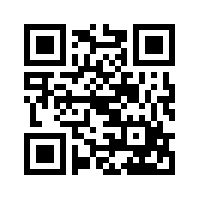
| Here's a QR link to this blog... |
2. Text: The app displays the text on the screen; with the added option of sending it by SMS or Email. On the K550, you can select SMS, after which you can use Copy/Paste to copy the text into the clipboard and use it later outside the application.
3. Other formats: like VCF, Calendar entries etc can all be created on qrstuff.com. The only problem is that if your data size is too big, there is a probability that the the smallest shake of the camera or target will render your code unreadable. So keep it short! Moreover, when the camera has a 2MP camera theres an inherent limit to how dense a QR it can read anyway.
The K550 camera with AF gives superb shots of QR codes in most cases - unless you shake the camera. To eliminate the popup that constantly asks for permission to use the camera, go to
Applications> Kaywa ...> More> Permissions> Multimedia and Select Ask Once.
A summary of some other types and technologies in 2D barcodes is here.
Text Messaging on Roaming
If you find that your text messaging service (SMS) starts acting up when you are roaming, try the following:
From the Main Menu, go to
Settings > Connectivity > Data Comm. > SMS Access
and set it to Circuit Switched.
This should work for most Sony Phones. For other phones use your discretion!
From the Main Menu, go to
Settings > Connectivity > Data Comm. > SMS Access
and set it to Circuit Switched.
This should work for most Sony Phones. For other phones use your discretion!
Weather Updates on-the-go
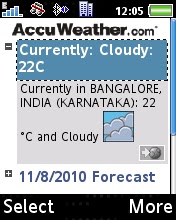
I ran into some rough weather a few days back and realized it would be a great thing to have weather updates and forecasts on the phone. I use the Forecast-Fox add-on in Firefox for the weather data which I can only use when I'm using my computer. This pulls data from Accuweather which i find fairly accurate. To get this data on the phone over GPRS, do the following:
1. On a PC go to Accu Weather RSS Centre: http://www.accuweather.com/rss-center.asp
2. Enter your location and select whether you want Metric or English units.
3. Get the URL of the web feed.
4. Go to this address using the inbuilt browser of your phone.
5. Click on "Yes" to add this feed to the inbuilt RSS Reader.
6. You may want to set this feed to update once every day. This can be done from the "Schedule Update" option for each individual RSS feed.
Screenshots for the RSS feed are given below:
Waiting at the traffic lights
Shot this while waiting for the lights to change at the main gate...
Moving vehicles and lights paint a pretty picture...
Friendship Tips
The carton of a rechargeable LED lamp became the source of much entertainment when it offered some friendship tips. The words are English, but...
Halebid
Halebidu, in Hasan district, Karnataka is the site of two beautiful temples built by the Hoysala Dynasty and destroyed by the invading army of Malik Kafur.
Sunset at CEDT
And as the sun sets on another academic year at CEDT, soon to be graduates prepare for the final demos of projects to be displayed in the upcoming department Expo.
Subscribe to:
Posts (Atom)